
AI Estimator
AI estimating for fabrication and configurable products
Win more work by replying while leads are still warm, and protect your margins with pricing based on your own past jobs. AI Estimator handles the takeoff and draft pricing, automating the repetition and grunt work.
Takeoff from drawings, DXF and STEP files
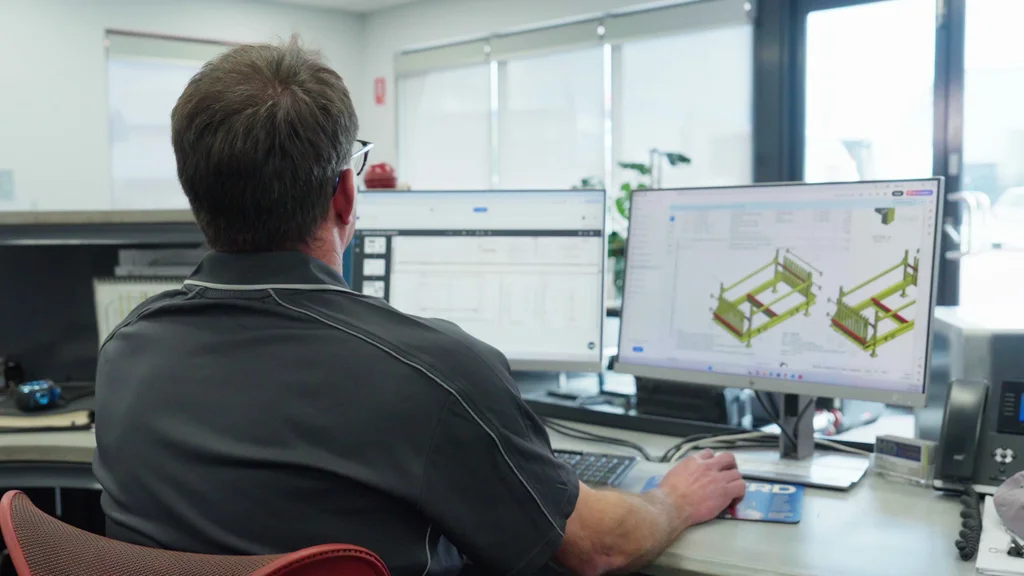
Built for make-to-order manufacturers
If your business prices bespoke fabrication, engineering, or project work from client-supplied drawings, this is built for you.
The Reality of Estimating
Sound familiar?
Quotes take too long
Manual drawing review and pricing can delay your response to a customer enquiry.
You're paying for quotes that go nowhere
Every unsuccessful bid still costs estimating time. Repeated manual takeoffs add to that cost.
Manual mistakes
A missed line item or wrong specification can go unnoticed until production starts, adding unplanned costs.
Your most expensive person is doing admin
Every hour your senior estimator spends on data entry and preparation is an hour you're paying trade rates for paperwork.
Estimating workflow
Every step is handled, ready and waiting
Inbox capture
Email message and attachments read for you.
3D modelling
Optionally, customise product visually or verify sizing in 3D space.
Human review
Review marked line items requiring clarification, then approve. Keeps human expertise at the heart of estimating.
Learn more
Product Demo
From customer drawing to reviewed quote
Automated takeoff
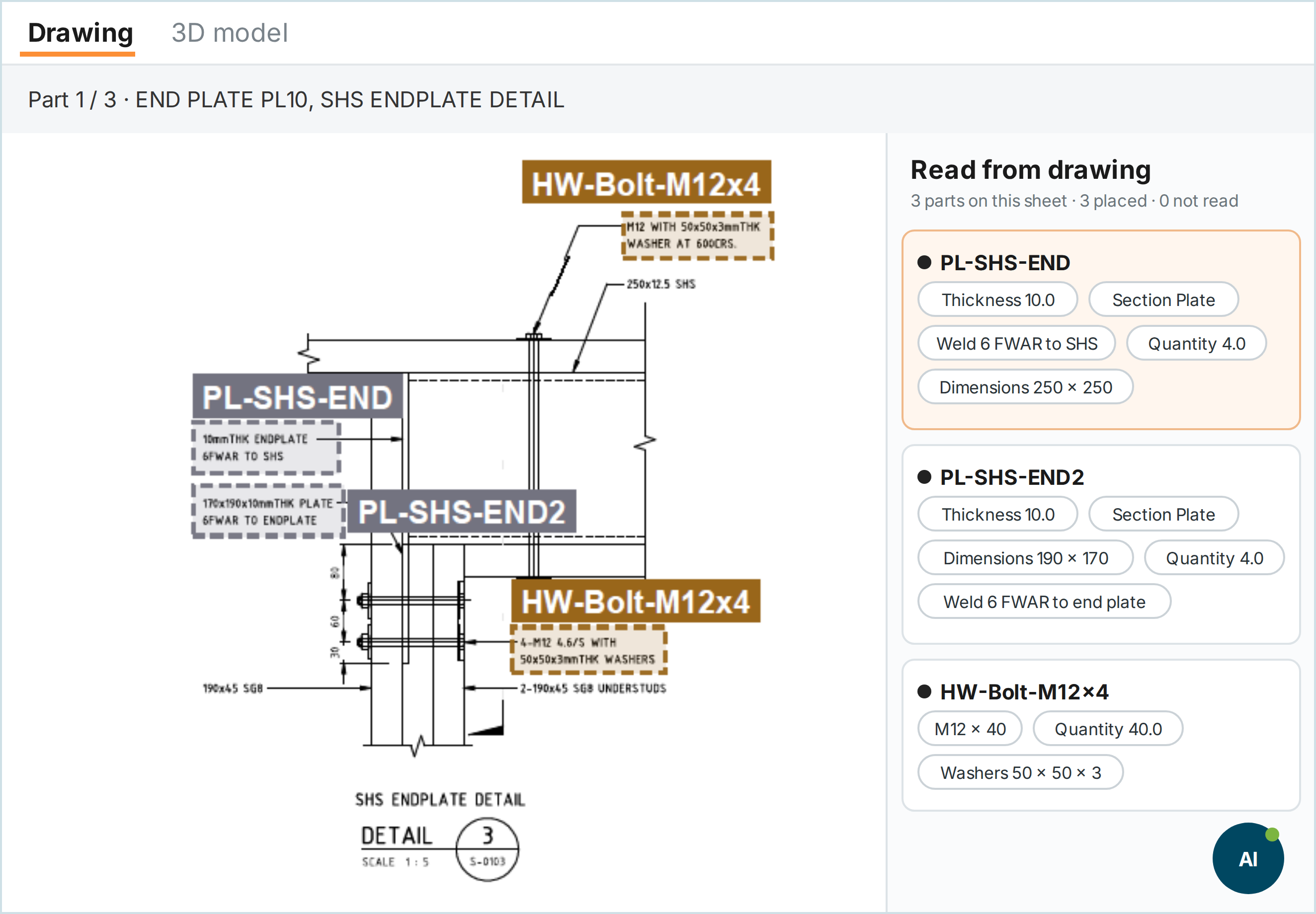
Get a draft Bill of Materials straight from the drawing
Whatever lands in your inbox, AI Estimator reads it. It finds the materials, dimensions and quantities for the job, then builds a full Bill of Materials.
- Reads PDF, DWG and DXF drawings, including multi-page sets, and keeps only what’s relevant
- Handles scans, mark-ups and hand sketches, and flags anything unclear for your estimator
- Reads the whole RFQ package, including specs, cover letters and email threads, so the quote reflects the full brief
- Handles layered drawings with multi-level assemblies and sub-assemblies
- Marks on the drawing where each number came from, so your estimator can check any figure against the source
Per piece costing
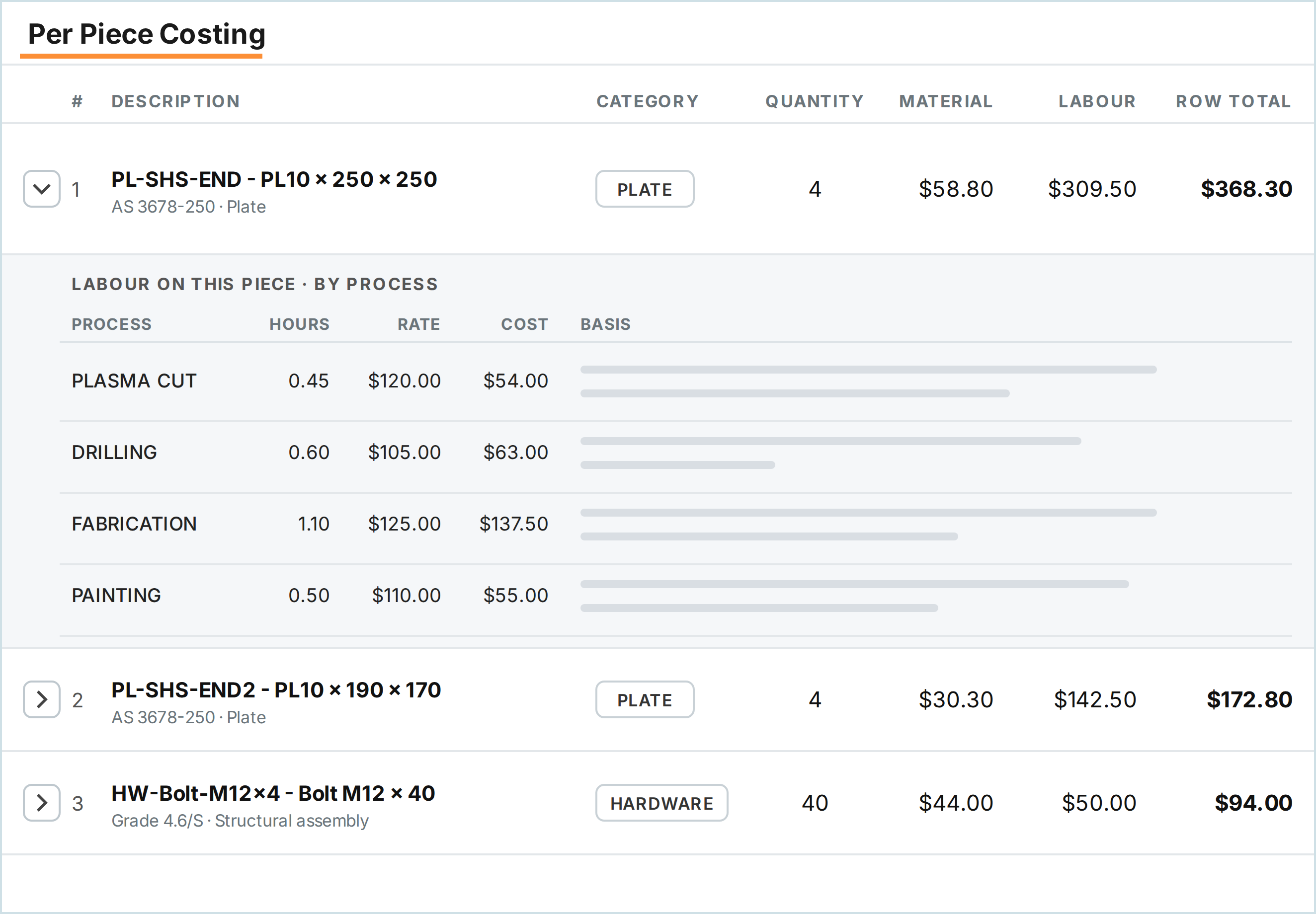
Dig into the material and labour cost of every piece
Open any piece to see how its cost is built up: the material, then the labour by process, with the hours and rate behind each figure.
- Every piece itemised, with quantity, type, dimensions and estimated labour to build it
- One Bill of Materials that your front office quotes from and your shop floor builds from
Human review
No quote goes out until your estimator signs off
Fabrication is individual to every fab shop, and it still requires human expertise. A quote can win or lose the work, so our goal is to support the professionals who make the judgement calls behind it.
AI Estimator prepares the draft quote and flags exactly what needs clarification, so your estimator can double-check it before it’s sent to the customer.
Every line gets a confidence score. A line is flagged when AI Estimator couldn’t read the drawing, couldn’t match the item to your price book, or when a price, hours or margin breaks AI Estimator’s built-in rules or is outside the historical average for similar jobs.

See every step and who does it
AI Estimator does the legwork, and you make the calls.
Preparation and approval are different jobs. Smart Shop Floor prepares the working draft; while the estimator is always in control: deciding what goes out to the customer.
- You
1. Provide the scope
Add the drawings and scope notes so the estimate reflects the requested work, not just the file contents.
- AI Estimator
2. AI reads the drawing
AI Estimator reads the drawing and pulls out the materials, dimensions and quantities. It builds a draft bill of materials and labour requirements.
- You
3. Check the extracted bill of materials
Review materials, dimensions and labour hours alongside their drawing sources. Every line gets a confidence score, and a line is flagged when AI Estimator couldn't read the drawing or couldn't match the item to your price book. You fix those lines before costing.
- AI Estimator
4. AI prices the job
Your price book, labour rates and margin rules are applied automatically. Outsourced processes and materials are flagged, and supplier RFQ emails are drafted with the relevant specs pulled from the job.
- You
5. Review the final costs
Review labour, outsourced work, margins and any missing scope. Check the totals against your closest past jobs, which are matched and ranked for you. Adjust anything that doesn't look right.
- You
6. Approve and generate the quote
Once you're happy with the draft, generate a PDF quote using your customised template.
Customer-ready quote
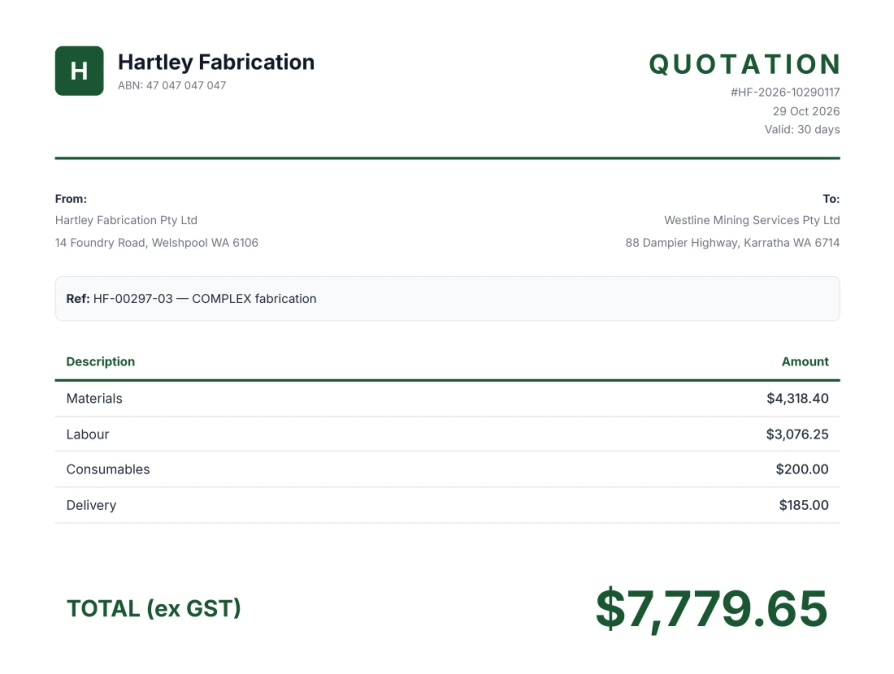
Branded PDF quote, good to go
Once your estimator approves the draft, AI Estimator builds the quote as a branded PDF in your own template and drafts the email to go with it.
Every sent quote is tracked in one place, so you can see which ones are still waiting on a customer’s answer.
Customer story
MetalWest: quotes back in less than half the time


Winning more work
“The ability of the AI to quote while I’m on the road with minimal information is allowing us to win more work and therefore increase margin.”
Time saving
“While reviewing drawings or talking to clients, I can have quote requests coming through hourly. Rather than a backlog of work that I have to get through, the system is working while I’m working. It will enable us to double our capacity.”
Accuracy
“The AI tool has been programmed exactly as I would review the drawing. Both the AI scheduling and quoting are more accurate than any employee I could employ.”
Getting Started
3-2-1 quote
Upload price book and set up price rules, including margin and labour rates.
Smart Shop Floor team helps calibrate the system over 3 to 5 sessions, assisting you with guided setup.
Start preparing quotes with your approved configuration.
Total IP Control
Security
Drawing security
Your drawings are stored on your server or deleted after processing.
Your shop's estimating knowledge
Shop-specific training uses your historical quotes to reflect your estimating approach. Confirm data access, retention and permitted training use as part of your agreed deployment and data-handling scope.
Confidentiality
We work with defence and other sensitive industries. Confirm account access permissions and confidentiality requirements as part of your deployment scope.
Enterprise-grade access controls
Role-based permissions and two-factor authentication come standard. Only estimators and stakeholders who need to see pricing and financial information can access it.
Drawing-based estimating for fabrication shops
Do I need an ERP to use AI Estimator?
No. AI Estimator works equally well as a standalone solution or fully integrated with your existing ERP. Use it as a focused tool, or connect it to the rest of your systems.
How does job-shop quoting start from a drawing?
For a custom fabrication enquiry, SAM Estimator reads the drawing and prepares materials, parts and labour in a working draft. Your estimator reviews the takeoff and pricing before the quote is sent. This is different from selecting a standard product from a price book.
How does the estimate reflect our own shop?
SAM Estimator is trained on your historical quotes to reflect your materials, processes and estimating approach. It prepares a draft takeoff, bill of materials and labour estimate for your estimator to review and approve.
Is this the same as product quoting?
Drawing-based fabrication starts with interpreting the customer's drawings. Catalogue and configurable-product quoting use the relevant product selections and price-book rules. The two workflows support different types of enquiry.